


Ask a mobile DJ what carries the show and the answers usually start with the controller. In practice, the first thing that fails at a gig is almost never the controller — it is the cabling underneath it: a hum on the microphone channel, an unbalanced line run picking up light-stand dimmer noise, a speaker lead that is too thin for the distance to the subs. A DJ booth is a small signal system, and the cables that tie it together fall into four distinct families: balanced XLR runs, line-level interconnects, speaker cables, and the snake or multiconductor looms that keep all of it organised. This checklist works through each family in signal order, using cable types we manufacture at LESOUND under the Yinyu name as concrete reference points, so a booth can be wired deliberately instead of improvised from whatever is in the bag.
Start by Inventorying What Actually Plugs In
A typical mobile booth contains a small number of device classes, and every cable in the system serves one of them:
- Sources and control — laptop, media players and the mixer or controller, which exchange line-level audio and sometimes MIDI.
- Microphone — a handheld or a mic on a boom for announcements, almost always on a balanced XLR connection.
- Amplification — either active (powered) speakers fed line level, or passive speakers fed amplified speaker-level signal.
- Lighting — fixtures on stands or a totem, receiving DMX data and mains power.
Each class uses different cable construction, and the failures come from treating them as interchangeable. A microphone cable is not a speaker cable, a speaker cable is not an instrument cable, and a DMX run deserves proper data cable on anything longer than a short hop. The DJ booth itself only defines the furniture; the signal chain is what makes it work, and it deserves its own packing list.
Balanced XLR Runs: the Backbone of the Booth
Balanced XLR is the correct connection for everything that carries a low-level signal across a stage: microphones, direct boxes, long mixer-to-processor runs and the link from a booth-mounted mixer out to active speakers. Balanced signalling cancels noise that the cable picks up along the way, which is why it is worth insisting on genuine balanced construction — an OFC conductor pair with a braided shield — rather than a thin unbalanced lead with XLR connectors fitted to the ends.
Our MC-series microphone cables are built exactly for this duty. The MC041, for example, sits in the colour-ring portion of the range, where a coloured ring near each connector identifies the cable at a glance — a small feature that matters once four identical black leads live in the same bag and two of them belong to the lighting rig. The series uses twisted OFC conductors with braided OFC shielding in a flexible jacket, so the lead coils cleanly for packing and shakes out without kinks at the gig.
Two habits make XLR runs behave in a booth. First, keep direction consistent: female ends point toward sources, male ends point toward the mixer or the speakers, so every cable in the crate connects the same way without hunting for the right end. Second, give the microphone its own route away from mains blocks and dimmer packs — a balanced line rejects induced noise well, but there is no reason to test that claim at close range. Our overview of microphone cables covers the construction details worth checking before ordering.
Line-Level Interconnects: RCA, 6.35 mm and the Adapter Question
Between sources, controllers and processors, most of the traffic is line level, and the connectors vary by device generation: RCA phono on consumer-style media players, 6.35 mm TS or TRS jacks on mixers and processors, 3.5 mm on laptops. Dedicated interconnects exist for each pairing. An AC047M, for instance, is a 6.35 mm TS to dual-RCA lead in one-, two-, three- and five-metre lengths on 2 × 25 AWG conductors, which is the natural way to feed a pair of RCA inputs from a single jack output. An AC085P runs XLR female to 3.5 mm TRS, bridging a laptop output into a professional input.
Adapters earn their place in the lid of the cable case. A compact XLR-to-RCA barrel such as the CC041 or CC042 rescues a gig when an input standard changes, and an RCA-to-6.35 mm adapter does the same in the other direction. The distinction to hold on to is between a planned interconnect and a rescue: an adapter in the middle of a permanent signal path adds two more contact points to maintain, so it belongs in the spares pouch rather than the core loom. Where a booth is wired once and rebuilt the same way every weekend, dedicated audio cables for each pairing keep the signal path short and the troubleshooting simple.
Speaker Cables Are a Different Animal
The most consequential mix-up in booth wiring is using a microphone or instrument lead where a speaker run belongs. A passive speaker draws real current from the amplifier, and a signal-grade cable cannot carry it: the conductors are too thin, the run gets hot losses and weak bass, and in a worst case the thin conductors become a fault point. Speaker cable is a separate product class for good reason.
Our SC001 sits in the low-noise OFC speaker-cable line, built around large OFC conductors in a flexible jacket so it can be coiled, taped down and re-coiled through a full season of one-night shows. The wider FC series steps through the common cross-sections, and the progression is the practical answer to the length question: FC208PG at 2 × 0.83 mm² (18 AWG) for short hop-ups, FC215PG at 2 × 1.5 mm² (15 AWG) and FC220PG at 2 × 2.07 mm² (14 AWG) for mid-length runs, and FC225PG at 2 × 2.5 mm² (13 AWG) or FC240PG at 2 × 4.0 mm² (11 AWG) where the amplifiers sit well away from the subs. The longer the run, the more conductor area the current deserves.
Connector choice matters as much as gauge. A locking Speakon-style connector such as the CS001 locks with a twist and cannot back out of its socket when a lead is kicked, which is why it has become the default on professional passive gear. Where a mixed inventory of older cabinets and amplifier plates is involved, Speakon-to-6.35 mm and Speakon-to-XLR adapters in the CC range keep legacy cabinets in service without re-terminating everything at once.
Taming the Loom: Snake and RJ45 Options Behind the Facade
Once a booth grows past a controller, a microphone and a pair of tops, the bundle of individual cables becomes its own problem — and the fix is consolidation. A multiconductor snake carries several channels in one jacket, and our audio snake line runs from four to twelve channels with length options from 2 to 20 metres, built on twisted OFC conductor pairs with AL-foil plus braided OFC shielding. For a booth that feeds monitors or a remote mixer position, one snake replaces a fistful of separate leads and cuts pack-down to minutes.
An interesting middle option for DJ booths specifically is the RJ45-to-XLR breakout. The SNA105 presents one RJ45 socket as four XLR female connections, the matching SNA106 does the same as four XLR males, and a combo-chassis version (SNA107) mixes the two; all three use an aluminium shell, and other models in the family add ground-lift switches. Paired with a quality SFTP Cat6A patch lead — the same construction our ethernet snake range uses, with braided shielding over twisted pairs — one slim cable under the DJ table does the work of four XLR tails. For booths that are rigged and struck weekly, that difference in bulk is not cosmetic: it decides whether the loom fits in one bag or two.
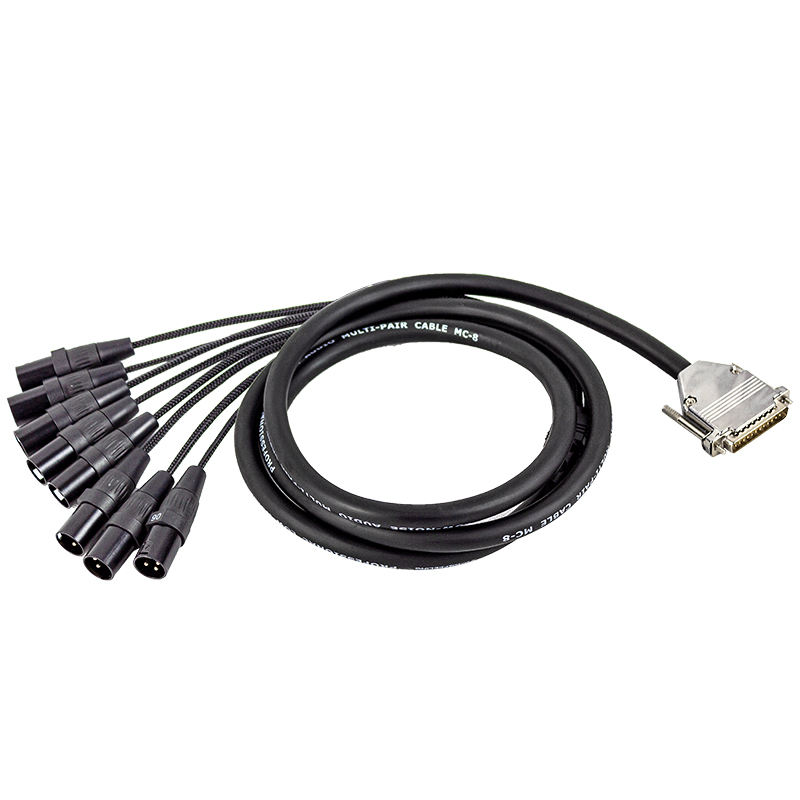
Where several channels travel a real distance — a booth at the back of the room, a stage box at the front — a drum-mounted snake keeps the spare length coiled and tangle-free, and the channel counts and length options listed in our audio snake cables range make it straightforward to standardise one model across an entire rental fleet.
Lighting Data and Mains: Keep DMX and Power in Their Lanes
Lighting completes the booth, and it brings two more cable families with it. DMX data should run on dedicated DMX cable — our DMX001 uses an OFC conductor pair with combined braided and foil shielding in a flexible jacket, built for data integrity rather than just connector fit — and the DMX007/008/009 converters handle the crossings between 3-pin and 5-pin fixtures without adapters improvised from XLR barrels. On short runs between a controller and a pair of effects lights, a microphone lead will often appear to work; as fixture counts and distances grow, that substitution becomes the standard explanation for flickering rigs, so dedicated data cable is the safer default for anything beyond a casual hop.
Mains power for the lighting rig follows its own rule: separate it from the signal loom. Run power down one side of the booth and signal down the other, cross at right angles where a crossing is unavoidable, and use the hybrid lighting-cable drums built for the purpose — power and signal conductors in one managed reel — rather than taping extension leads to the same bundle as microphone lines. The lighting stands page covers the rigging side; the cabling habit is the other half of a rig that neither hums nor flickers.
The Pre-Gig Checklist
Condensed to a card that fits in the cable bag lid, a DJ booth wiring check looks like this:
- Microphones and long signal runs on balanced XLR with braided-shield construction; colour rings to tell leads apart.
- Line-level pairings on dedicated interconnects — RCA, 6.35 mm and 3.5 mm leads chosen for the actual devices; adapters only as spares.
- Passive speakers on real speaker cable, gauge matched to run length, with locking connectors where the gear allows.
- Consolidated looms — a four-to-twelve-channel snake or an RJ45-to-XLR breakout instead of loose parallel leads.
- DMX on data cable, 3- and 5-pin crossings handled by proper converters.
- Power and signal separated — opposite sides of the booth, right-angle crossings, managed reels for lighting power.
Before Ordering: What to Confirm With the Factory
Whether buying finished goods or specifying a private-label programme, four questions separate a cable kit that lasts from one that turns over every season:
Construction per family. Balanced lines should show OFC conductors and a braided shield; speaker leads should show their cross-section and conductor count; data cable should show its shielding construction. A manufacturer that states these plainly per model is easier to buy from than one that photographs connectors.
Length and connector options per model. The same cable family should be orderable in the lengths the booth actually uses, and connector variants — Speakon-style, combo chassis, 3- and 5-pin — should be a catalogue choice, not a custom project.
Identification features. Colour rings, printed model names on the jacket and numbered channels on snakes all shorten setup time; ask which models carry them.
Packing. Reels, drums and channel bags are part of the product for mobile use, and they are worth specifying rather than accepting by default.
Conclusion
A DJ booth is only as reliable as its weakest cable family, and the families are few: balanced XLR for microphones and long signal runs, dedicated interconnects for line level, properly gauged speaker cable for passive boxes, consolidated snakes for the loom, and data-grade DMX kept apart from mains. LESOUND manufactures the full Yinyu cable range in-house — microphone, interconnect, speaker, snake, connector and DMX families under common construction standards — which means lengths, connectors and identification features can be matched to how your booth is actually rigged, including OEM cable programmes under your own brand. Audit the current bag against the checklist above, retire the substitutions, and the booth will plug up the same way every night — which is the outcome every cable in the case is quietly working toward.
Post time: Sep-29-2026